
Grocery AI: Shop, Cook, Pantry
Pocket LabsFood & Drink
3.879.00 Reviews
- Version
- 3.2.0
- Installs
- 10.00K
- Age Rating
- Everyone
Screenshots
Our Review of Grocery AI: Shop, Cook, Pantry
 Analysis by Appyee
Ever found yourself wandering the grocery aisles, hopelessly lost and unsure of what you really need? Well, I’ve been there too, and that’s why I got super excited when I stumbled upon Grocery AI: Shop, Cook, Pantry. This app is like having a personal shopping assistant, chef, and inventory manager all rolled into one neat package.
Where the routine can snag
The promise of tying shopping, cooking, and pantry tracking together is appealing, but it also means the app is most useful when you keep those parts in step. A list can only save a trip if it reflects what is actually at home, and a recipe suggestion is only practical when the ingredients you have recorded are reasonably current. I find it helps to treat the app as a working kitchen notebook, not as an automatic record of every item in the cupboards.
That distinction matters most during a busy shop. If you add something to the list while walking through the store, take a moment to check whether it is already in your pantry or whether another household member has put it in the shared list. AI suggestions can be a useful prompt, but I would still review them before buying; a recommendation is not the same thing as knowing what your household will eat this week.
First Impressions and Setup
Getting started with Grocery AI: Shop, Cook, Pantry was a breeze. The interface is clean, and the setup process is as intuitive as it gets. You just download, open, and follow a few simple steps to customize your experience. It immediately feels like you’ve got a grip on your kitchen chaos. The app asks about your dietary preferences and any specific ingredients you might want to avoid, which is a nice touch.
Grocery AI is a free food-and-drink app from Pocket Labs, with optional in-app purchases priced from around sixteen to one hundred dollars per item. It is rated for everyone, has a 3.9 average from around 340 ratings, and has passed ten thousand installs. Version 2.4.7 is listed for Android 6.0 and newer. I’d start with the free experience and see whether the routine fits before considering any purchase; the right value depends on how often you use the connected planning tools.
Setup checks that make the advice useful
When setting up preferences, I’d be precise rather than broad. If you avoid an ingredient, record that clearly instead of relying on memory later, and make sure the household’s preferences are not being confused with one person’s temporary choice. This is especially helpful when you use recipe ideas to plan shared meals: the more accurately you describe what belongs in your kitchen, the less sorting you have to do after suggestions appear.
Another practical choice is deciding what you want the app to manage. Some people want a near-complete pantry record; others only need a short list of staples and items they often forget. I prefer beginning with frequently used ingredients, then adding more when a recipe or shopping trip gives me a reason. That keeps setup from becoming a separate chore and makes any pantry-based recommendations less likely to be undermined by an incomplete inventory.
Using it as a kitchen routine
Rather than trying to organize everything at once, I’d build a small loop: check what is on hand, choose a meal, add missing ingredients to the list, and update the pantry after shopping. The benefit is not that the app can make every decision for you; it is that these steps can sit together instead of being scattered across memory, scraps of paper, and separate recipe searches.
Shopping Made Simple
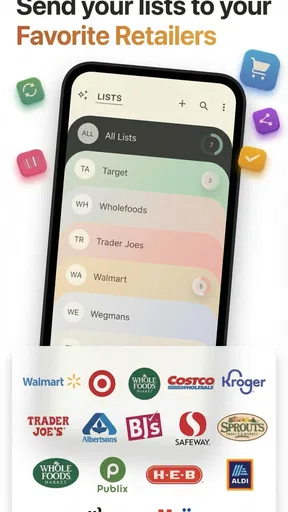
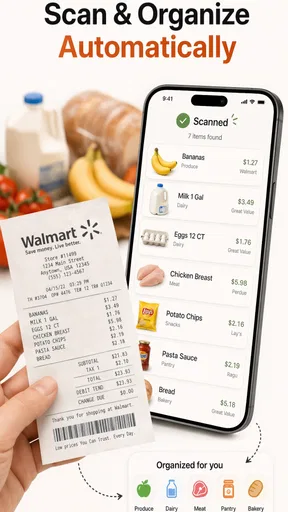
One of the standout features of this app is its shopping list functionality. You can either manually add items or let the AI suggest things based on your past purchases and recipes you’re interested in. It’s like the app knows you better than you know yourself! Plus, it organizes your list by category, making it super easy to find what you need without doubling back through the store.
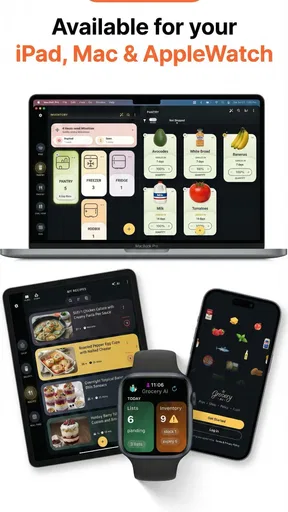
What really impressed me is the real-time syncing feature. If you’re sharing shopping duties with someone, you both can update the list simultaneously, and it’s reflected instantly. No more double-buying or forgetting that crucial ingredient!
A useful handoff between shop and home
For a realistic weeknight workflow, I’d check the pantry before leaving, pick a recipe that makes sense for the evening, and put only the missing ingredients on the list. At the store, category grouping can make the route feel more orderly, while shared updates help if one person is shopping and another remembers an item at home. Once back, I’d mark what was bought and add only the ingredients that are worth tracking. This small handoff is more reliable than trying to reconstruct the whole shop later.
There is a trade-off: keeping a shared list current depends on everyone using it consistently. If one person texts additions while the other edits the app, the household can still end up with duplicates or missed items. I’d agree on one place for changes and check the list before checkout. The syncing is valuable for coordination, but it does not remove the need for a clear routine.
Culinary Inspiration
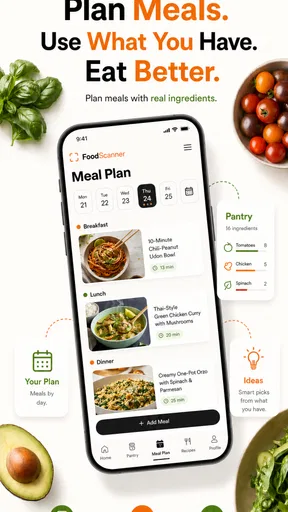
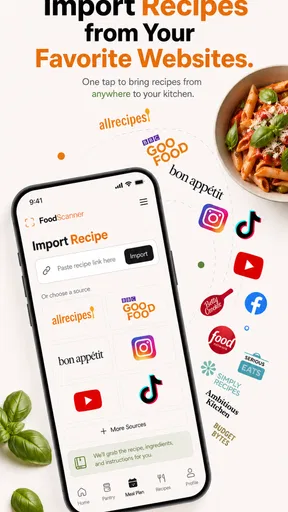
Now, let’s talk about the cooking aspect. The app houses a treasure trove of recipes that cater to all sorts of dietary needs and preferences. Whether you’re a vegan, a meat-lover, or somewhere in between, there’s something for everyone. You can even search for recipes based on what you already have in your pantry, which is a lifesaver for those nights when you just don’t feel like making another grocery run.
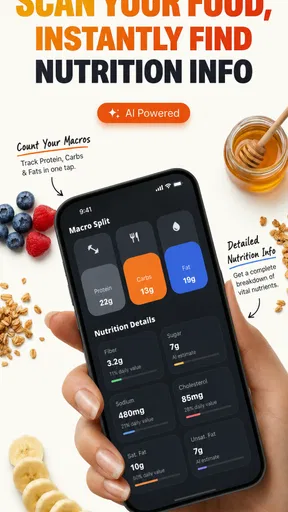
The step-by-step instructions are clear and easy to follow, even for someone who’s not exactly a MasterChef. Plus, each recipe comes with nutritional information, so you can keep track of what you’re putting into your body. It’s like having a dietitian right in your pocket!
Making recipe ideas work in real life
Pantry-based recipe searching is most useful when I treat it as a way to narrow the options, not as a guarantee that dinner requires no shopping. Before committing, I’d check the recipe’s ingredients and decide whether a missing item is worth buying or whether another meal is a better fit. This avoids the common trap of choosing a tempting recipe and discovering too late that the one essential ingredient is not actually available.
It can also help to plan around ingredients that are easy to use in more than one meal. If a recipe calls for a perishable item, I’d look for another way to use it during the week before adding it to the shop. That turns recipe browsing into a practical plan and can make pantry tracking more worthwhile. The app can bring ideas and lists together, but I still prefer to use my own judgment for portion sizes, substitutions, and whether a meal suits the time I have.
For strict dietary or medical needs, I would read each recipe and its ingredients carefully rather than treating a preference setting as a safety check. A saved preference can help guide discovery, but it should not replace checking what goes into a dish or confirming that a product is suitable for a particular person.
Pantry Management
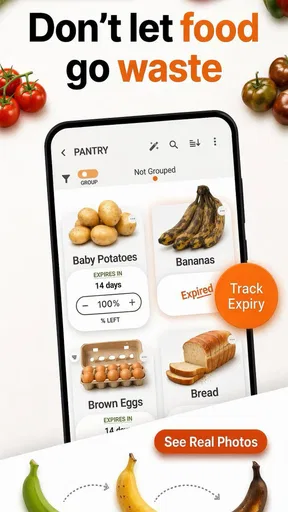
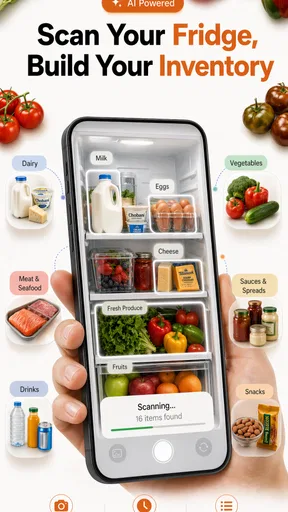
This might be my favorite feature: the pantry management system. How often do we buy ingredients only for them to get lost in the back of the cupboard? With this app, you can keep track of what you have, what’s about to expire, and what needs replenishing. The app even sends reminders to use certain items before they go bad, helping reduce food waste.
It’s a simple yet powerful way to keep your kitchen organized and efficient. No more forgotten cans of beans or mystery items lurking in the depths of your pantry!
Keep the inventory useful, not perfect
The biggest practical weakness of any inventory habit is the work of maintaining it. If every snack, condiment, and half-used ingredient has to be entered and adjusted, the tracking can become more demanding than the problem it solves. I’d focus first on food that is expensive, easy to forget, or likely to spoil. A quick update after unpacking groceries is generally easier than trying to remember several days of changes all at once.
Expiry reminders are prompts, not a substitute for checking the food itself. I’d use them to decide what to cook soon, then inspect the item and follow sensible food-safety judgment. If the household shares cooking and shopping, it may also help to agree who updates the inventory after a meal. Otherwise, the record can drift from reality, and recipes based on it become less dependable.
When another tool is the better fit
Compared with a basic notes app or a paper list, this app asks for a little more participation, but it connects shopping decisions with recipes and pantry information. That connection is the reason I’d choose it: it can help someone who wants to turn “what should I buy?” into “what can I cook with what I have, and what is missing?” A plain list is still better for someone who only needs to remember a few items and does not want to maintain an inventory.
Likewise, people who already have a meal-planning system they enjoy may not gain much from moving everything into another app. Grocery AI makes more sense for someone who wants one food-focused routine and is willing to keep it reasonably up to date. If you shop spontaneously, rarely cook from recipes, or do not want to record pantry items, the extra structure may feel like overhead rather than help.
If a screen seems out of date or a list does not reflect a recent change, I’d first check that I am looking at the right list and that everyone involved has entered changes in the same place. Then I’d close and reopen the app, confirm the device has a working connection, and try again. Those are sensible first checks for an app that relies on shared updates; I would not assume a missed item means the whole planning routine has failed.
Who I’d recommend it to
I think the strongest match is a household that cooks at home regularly, shares shopping, and wants to reduce forgotten ingredients or repeat purchases. It can also suit a solo cook who often looks at the pantry and struggles to turn odds and ends into a meal. The value is less obvious for someone who buys the same short list every week, because a basic checklist may already do the job with less upkeep.
Final Thoughts
At the end of the day, Grocery AI: Shop, Cook, Pantry is an app that truly transforms the way you approach grocery shopping and meal prep. It’s intuitive, user-friendly, and packed with features that make your life easier. Whether you’re a busy parent, a college student, or just someone looking to streamline your shopping and cooking routine, this app is a game-changer. It’s not just about convenience; it’s about creating a smarter, more efficient way to manage your food.
If you’re ready to say goodbye to grocery store confusion and hello to culinary organization, give Grocery AI: Shop, Cook, Pantry a try. You might just wonder how you ever lived without it!
Verdict
Strengths of Grocery AI: Shop, Cook, Pantry
- User-friendly interface for easy navigation.
- AI suggests recipes based on your pantry.
- Syncs seamlessly across multiple devices.
- Barcode scanner for quick product entry.
- Customizable shopping lists for convenience.
Limitations of Grocery AI: Shop, Cook, Pantry
- Limited international recipe options.
- Some features require premium subscription.
- Occasional bugs with barcode scanner.
- Minor lag on older devices.
- Limited offline functionality.
Similar Picks in This Category
View All
Rappi: Food Delivery, Grocery
Rappi, Inc - Delivery3.5

McDonald’s: Cupons e Delivery
Arcos Dorados4.3

Swiggy: Food Instamart Dineout
Swiggy4.7

Blinkit: Groceries & more
Blinkit4.8

foodpanda: food & groceries
Foodpanda GmbH a subsidiary of Delivery Hero SE4.0

Zomato: Food Delivery & Dining
Zomato4.7
Frequently Asked Questions
What features does Grocery AI: Shop, Cook, Pantry offer?
Grocery AI: Shop, Cook, Pantry is designed to streamline your grocery shopping and meal planning. It offers features like smart shopping lists, recipe suggestions based on available ingredients, pantry inventory management, and personalized meal plans. The app utilizes AI to recommend meals, ensuring you make the most of what you have at home. It's a comprehensive tool for efficient kitchen management.
Is Grocery AI: Shop, Cook, Pantry user-friendly for beginners?
Yes, Grocery AI: Shop, Cook, Pantry is designed with an intuitive interface that makes it accessible for users of all experience levels. Beginners can easily navigate through its features, thanks to clear instructions and a straightforward layout. The app guides users in setting up their pantry, creating lists, and accessing recipes, making the process smooth and enjoyable.
Does Grocery AI: Shop, Cook, Pantry require an internet connection?
While an internet connection enhances the app's functionality, especially for accessing real-time updates and syncing data across devices, Grocery AI: Shop, Cook, Pantry offers offline capabilities. Users can manage their pantry and access saved lists and recipes without a connection, making it convenient for use in areas with limited internet access.
How does Grocery AI: Shop, Cook, Pantry help with meal planning?
The app offers personalized meal planning by analyzing your pantry's inventory and suggesting recipes that maximize the use of available ingredients. It provides a variety of meal options tailored to your preferences and dietary restrictions. This feature not only saves time but also reduces food waste by ensuring you utilize what you already have.
Is my data secure with Grocery AI: Shop, Cook, Pantry?
Grocery AI: Shop, Cook, Pantry takes user privacy and data security seriously. The app employs encryption and other security measures to protect your personal information and usage data. Additionally, users have control over their data, with options to manage privacy settings and review data sharing policies within the app.
